How to Market on Facebook: "

The biggest social media platform on the planet boasts a wide array of communication tools businesses use to find and engage their target communities. These digital features have been employed to hold contests and other public relations campaigns, increase email, RSS and other forms of subscription to web properties, communicate Facebook promotions to boost sales, and many other ways to help businesses meet their objectives. Facebook now allows users to check in to your place of business with their Places application. But in another article about Facebook advertising, allfacebook.com reminds us that beginner marketers often make mistakes that end up making Facebook rich, not their company. The key to avoiding that, as well as unlocking the scope of exposure and exponential interaction between your organization and your target community, lies in understanding how each tool is used and what each tool can do for your business.
Facebook Places
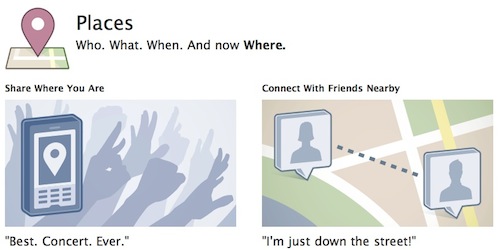
Facebook Places allows users to notify people in their networks that they and/or a friend is visiting your establishment. As more people check in and share that they are visiting your business, your exposure to more people is expanded. Offer premiums such as minor giveaways, discounts, and other incentives to have people frequently check in on Facebook Places.
Adding your Establishment
You can add your establishment by opening the Facebook application on your iPhone. Surf to the home screen tapping the upper-left button. Select the red-pin icon to open the Places application. Tap “OK” when you are cued to use your current location.
On other web-enabled mobile devices surf to http://touch.facebook.com on your web browser, and tap the Places tag, positioned on the right-hand side of the home page. Tap “Share Location,” when you are cued to share your current location. Or you could tap the teardrop icon that is the Places button positioned on the top right of the composer in News Feed. Tap “Share Location” when you are cued to share your current location. Once you claim your location as a business, it turns into a Facebook Page. You could post business updates and keep people who like your page abreast of any developments concerning your business.
Facebook Social Plugins
You should also understand the use of social plugins that can be incorporated into your site. Social plugins allow users to update their Facebook networks with content on your site. Understanding what happens when visitors operate each of these social plugins is key in employing Facebook in your website marketing efforts. Code generators and instructions on how to institute these features into your site can be found on Facebook’s developer documentation.
Like Button

One of the most widely used plugins is the Facebook Like button. When your visitors click on the Facebook Like button, the URL on which the Like button is embedded populates the user’s Facebook newsfeed. This newsfeed exposes this URL to a user’s friends on Facebook. Friends are typically friends because they share the same interests. So for the best pieces of viral material, once a URL is Liked, the URL is exposed to this user’s friends. A proportion of that user’s friends in turn Likes the content to share it with their friends. The exponential distribution of a URL is thus only limited by Facebook’s 500 million users and their sphere of influence.
Facebook Friends Who Like Your Site
The first step in showing which users Liked your website is building a Facebook page. A Facebook page allows you to communicate with your target community from a public profile. You can create and learn how to build a page by clicking on the green ‘Create a Page’ button on the Facebook Pages section. You will learn how to name your page, upload a profile photo, logos, and other branding images.
Facebook recommends you offer your address and contact information if you are a local brick and mortar business, or post samples of products you are selling. You could then specify under which category your business operates, add a profile picture, describe your business, and add custom tabs. You could customize tabs using Facebook’s Markup Language to add subscription forms, Flash animations, and other digital elements that could help you tighten your relationships with
people in your Facebook network. Once you publish your Facebook page you could get people to join your page by posting ads on Facebook, by inviting people to join on your mailing list, or your blog using the Facebook Like Box.
The Facebook Like Box
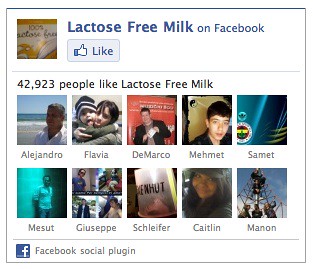
The Facebook like box social plugin allows your website’s visitors to see which of their friends Liked your website’s fan page. Seeing their friends may influence your visitors to Like your Facebook page and stay abreast with your updates. Additionally, visitors can view how many people Liked your website in total. The code generator allows you to code your box to show recent URL’s posted on your Facebook Page. The Like button allows visitors to show their support for your page without leaving your website.
Crowdsorcery
I asked a group of marketers on LinkedIn what were some of the ways they used Facebook to help drive business goals. Viewing a variety of ways that Facebook tools have been adopted can help you adapt successful tactics to your organizations’ marketing strategy.
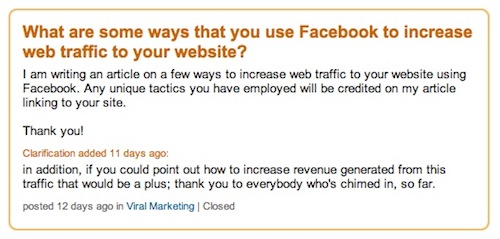
Steve Plunkett wrote that he has seen the most traffic when he posts special offers for Facebook users. Steve posts “links to ‘forms’ they fill out to get a special offer on Facebook.”
Columbia University Dean, Sree Sreenivisan, writes:
I think thoughtfully, strategically posting links on your FB wall can be effective. It’s the folks who post every link from their blog or site that will find diminishing returns.
Social Media Consultant, Eric Sornoso, recommends influencing people to comment and like your content you post on Facebook pages. Each time a user communicates with your page on Facebook, another link to your page is posted on the user’s newsfeed, exposing it to her friends. I have found people are more inclined to leave comments and interact with your Facebook pages when you ask questions and spark a gripping or compelling conversation. Ensuring you respond to as many comments as possible also increases interactivity. Eric states that he is in the process of building a custom page using FBML – Facebook Markup Language – that asks a user who Likes your page to invite their friends to Like your page. Other methods Eric recommends include the following:
Look at your competition’s Facebook page or similar pages and if you see anyone who’s very active with their community, send them a personal message inviting them to your page. Add a newsletter tab for your Facebook page. Another method to gain subscribers for your site. I use MailChimp. Add a Facebook Like (button) into the newsletter.
Marketing Manager, Daniel Griffin, recommends advertising to people of your targeted demographic group. Daniel suggests directing traffic from the advertisement to a landing page with the same message as the ad copy.
“This landing page should convey relevant information, good selling points of the product/service, a special offer and a prominent call to action (online booking form, contact form, e.t.c.),” Daniel wrote. “There should also be minimal links to other pages on the site (landing page), and it should be kept simple.”
Consultant, Laurel Miltner, also shares Daniel’s landing page recommendations to increase conversions and monetize traffic. Landing pages should communicate a clear call to action like buy, subscribe, or join.
“However, the call to action should be in line with what they got to the page for,” Laurel wrote. “For example, if they came to your page to read a blog post, but are inundated with “buy now” buttons, this will not likely work in your favor.”
In addition to optimizing and landing pages, I have found that capturing leads on a form built and hosted on Facebook with FBML increases conversions by 30 percent. I have found that there is a significant drop-off rate in conversion when people clicking ads on Facebook are directed to an external site. I recommend using FBML to capture the minimum information you require to follow up on a lead – e.g. name and email. Then following up with them to attain more information if necessary to complete a sale. Moreover, have the FBML page load different versions of the landing page for each visitors. This form of A/B split testing can help you determine which structure influences the most people to leave their contact information.
From 517 to 33,000 Fans in Two Weeks
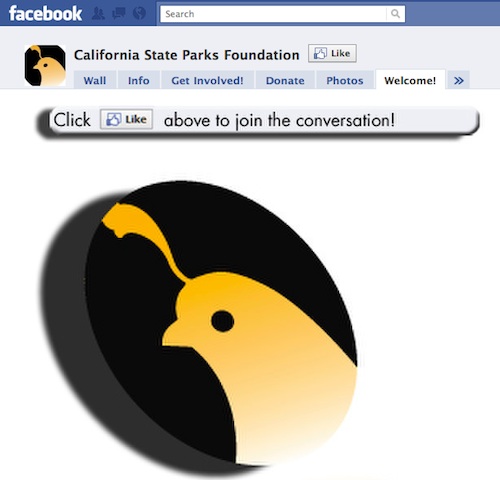
Daniel Burstein, editor at Marketing Experiments.com, linked me to a case study on how the California State Parks foundation grew their Facebook page through direct mail, telemarketing, email, and social networking. They basically used the aforesaid channels to communicate that 220 parks were threatened to be closed. They got 517 fans through “Find us on Facebook” calls to action on emails and the website. Daniel wrote the following:
The “Friend Get a Friend” campaign launched on Tuesday, May 26, on Facebook via an update to 517 fans – “This year’s cuts are ten times as bad, so we need ten times the fans on Facebook.” The update explained to recipients the imminent threat parks were facing and set a deadline and a goal – 5,000 fans by Friday (May 29).
The second Facebook update was sent on Monday, June 1 at 12:12 p.m. PST, stressing a 24-hour deadline and asking for fans and petition signatures. The California budget committee was scheduled to meet on June 2, so media coverage was at its height.
They got mainstream news coverage. They raised several hundred thousand dollars in nonmember one-time donations. They tripled the size of their email list. Their Facebook page has grown to over 58,000 fans. All 220 parks weren’t closed, but nearly 150 partially closed or reduced services.
Daniel states some of the key components that propelled this campaign to success was setting a deadline to incite action, allowing Facebook supporters to see how fan numbers grew to increase their motivation to help build the page further, and using all channels available. Finally, you could see there is a simple and clear call action on the Facebook page landing tab inviting visitors to Like the page.
What are some of the ways you use Facebook to market and grow your business online?
Neal Rodriguez is a social media marketing operator preparing for winter in New York City.
Thumbnail photo credit: pshab
Flowtown: Quickly turn emails into
social profilesFlowtown: Quickly turn emails into
social profiles
"
 I’m an RSS junkie, and while I realize that not all of the world’s problems can be solved using RSS, for many of us, more efficient use of our RSS readers can have a big impact on our overall productivity. As Google Reader seems to be one of the more widely-used RSS readers and is the that one I currently use, I thought it would be a good idea to share some tips for getting the most out of it.
 The trends page is surprisingly interesting and useful. You can find it in the left-hand navigation pane, or with this shortcut combination: g then <shift>+t. While you can get some interesting insights into which feeds you really read, when you read them and what you clicked, the real value is in pruning your feeds. Take a look at the frequently-updated feeds section of the subscription trends; these are the high volume feeds in your reader. Now, which ones do you really still read and which ones have the zero percent read rating? You can unsubscribe from the dead weight by clicking the conveniently-located trash can, and it won’t take you long at all to reduce the clutter.