Saturday, March 31, 2012
10+ Windows 7 services you may not need
10+ Windows 7 services you may not need: If you evaluate your organization's need for certain Windows 7 services, you may find that a number of them can be safely disabled.

6 Huge Tech Trends to Watch
6 Huge Tech Trends to Watch: 
These trends could make for huge opportunities--or huge disruptions to your business. Either way, they are ones to watch.
We’re only a few months into 2012, but several technology innovations are starting to show promise. Whether these trends will force you to change how you do business, or present you with entirely new opportunities depends on how willing you are to be an early adopter and take risks. You'll have to find room in your IT budget for these things, too. Whatever you do, keep these innovations on your radar:
1. Predictive technology
Several companies have started talking about their research into predictive tech. The idea is that, as computers become smarter, they can analyze historical data to make predictions. For example, Ford is using technology from Google to develop a navigation system that predicts, based on your previous routes, where you want to go at a specific time of the day. For small business, predictive tech could help in small ways: Your printer might forecast how much paper you will need next month, or help you arrange a better utility contract for heating based on trends form the past few years.
2. HTML5
There has been buzz about HTML5 now for the past few years. The new version of HTML provides a richer framework for videos and interactive content. Steve Jobs claimed it was a better approach to dealing with this rich content than Adobe Flash. One sign that HTML5 may finally replace Flash comes from the automotive world. In the upcoming Cadillac XTS sedan, the dashboard interface uses HTML5 so developers can make new apps without being confined to a specific code base.
3. High resolution displays
The Apple iPad 3 is the first sign that mobile devices are going ultra-high-res. The iPad 3 has a 2048 x 1536 screen that looks super-sharp for videos, e-books, and apps. But the iPad 3 is not the only device to offer much higher resolution. The Samsung Series 9 desktop display uses 2560 x 1440 pixels for a screen that looks much more sharp than most monitors.
4. Social analytics
I wrote recently about Sprout Social, a tool that helps you understand your social graph: how well you are connecting with others, your reputation, your follower stats. What I’m seeing lately is an uptick in “aggregators of aggregators”—tools like thismoment that takes the data obtained from Google Analytics, Facebook Insights, and others, and shows you how your company is doing on campaigns. As with any business endeavor, these super-aggregators are trying to get to the bottom line to understand whether social marketing efforts are paying off—or leading you nowhere.
5. Speech for business
One of the great features of Apple's Siri is its ability to understand context. You can add a reminder that tells your wife when you leave work. When you do, Siri sends the reminder based on your location. Lately, speech tech has shown signs of improving even more. Natural language searches will become commonplace in a few years—you will be able to walk into a conference room and say “tell everyone the meeting is cancelled” and the speech system will know what you mean and send the message.
6. Business-ready storage
Cloud storage has changed how Big Business operates—in some cases, larger companies are ditching their data centers altogether. But small companies do not even have data centers. Some of the choices for storage are making a huge impact—Dropbox is more popular than ever. But a new service called Huddle provides better reporting, security, and team accounts that is a better choice for business.


These trends could make for huge opportunities--or huge disruptions to your business. Either way, they are ones to watch.
We’re only a few months into 2012, but several technology innovations are starting to show promise. Whether these trends will force you to change how you do business, or present you with entirely new opportunities depends on how willing you are to be an early adopter and take risks. You'll have to find room in your IT budget for these things, too. Whatever you do, keep these innovations on your radar:
1. Predictive technology
Several companies have started talking about their research into predictive tech. The idea is that, as computers become smarter, they can analyze historical data to make predictions. For example, Ford is using technology from Google to develop a navigation system that predicts, based on your previous routes, where you want to go at a specific time of the day. For small business, predictive tech could help in small ways: Your printer might forecast how much paper you will need next month, or help you arrange a better utility contract for heating based on trends form the past few years.
2. HTML5
There has been buzz about HTML5 now for the past few years. The new version of HTML provides a richer framework for videos and interactive content. Steve Jobs claimed it was a better approach to dealing with this rich content than Adobe Flash. One sign that HTML5 may finally replace Flash comes from the automotive world. In the upcoming Cadillac XTS sedan, the dashboard interface uses HTML5 so developers can make new apps without being confined to a specific code base.
3. High resolution displays
The Apple iPad 3 is the first sign that mobile devices are going ultra-high-res. The iPad 3 has a 2048 x 1536 screen that looks super-sharp for videos, e-books, and apps. But the iPad 3 is not the only device to offer much higher resolution. The Samsung Series 9 desktop display uses 2560 x 1440 pixels for a screen that looks much more sharp than most monitors.
4. Social analytics
I wrote recently about Sprout Social, a tool that helps you understand your social graph: how well you are connecting with others, your reputation, your follower stats. What I’m seeing lately is an uptick in “aggregators of aggregators”—tools like thismoment that takes the data obtained from Google Analytics, Facebook Insights, and others, and shows you how your company is doing on campaigns. As with any business endeavor, these super-aggregators are trying to get to the bottom line to understand whether social marketing efforts are paying off—or leading you nowhere.
5. Speech for business
One of the great features of Apple's Siri is its ability to understand context. You can add a reminder that tells your wife when you leave work. When you do, Siri sends the reminder based on your location. Lately, speech tech has shown signs of improving even more. Natural language searches will become commonplace in a few years—you will be able to walk into a conference room and say “tell everyone the meeting is cancelled” and the speech system will know what you mean and send the message.
6. Business-ready storage
Cloud storage has changed how Big Business operates—in some cases, larger companies are ditching their data centers altogether. But small companies do not even have data centers. Some of the choices for storage are making a huge impact—Dropbox is more popular than ever. But a new service called Huddle provides better reporting, security, and team accounts that is a better choice for business.
Top 10 Ways to Get a Better Job [Lifehacker Top 10]
Top 10 Ways to Get a Better Job [Lifehacker Top 10]:

So your job sucks. You could resign yourself to a life of dull (or even miserable) days in the office or you could set aside some time and get a better job. Here are ten great tips to help you put together a great application, ace the interview, and ultimately work for a company you'll love rather than hate. More »


Friday, March 16, 2012
7 Resources Every JavaScript Developer Should Know
7 Resources Every JavaScript Developer Should Know:

A web developer today is expected to be an expert in every aspect of their craft and JavaScript is no exception. Years ago JavaScript seemed to be more of an annoyance, producing those trailers at the bottom of the browser. This has changed and JavaScript is a first-class citizen as a functional programming language and what seems like an unlimited number of resources covering the language.
I have been doing more and more JavaScript lately, both on the front-end and some node.js on the back end. I wanted to share some great resources I use for what’s new with regards to JavaScript libraries, projects and general reference.
This podcast is put together by the same creator of Ruby Rogues, another great podcast but instead talking about Ruby.
Each episode covers a particular topic and goes into detail about the pros and cons of using the technology. Recent episodes include Backbone.js (Jeremy Ashkenas) and co-hosted by Yehuda Katz (ember.js) and include some lively discussion between the two about Backbone.js vs. Ember.js and some design decisions made by the two frameworks.
Other episodes cover topics such as JavaScript Objects and Asynchronous Programming. Every episode to date has been filled with great bits of information and a wealth of other things to checkout. Be sure to check out the show notes from each show with links to things mentioned on the show.
This show is varies from JavaScript Jabber as it focuses more on new projects, updates to existing projects and all-around what’s happening this week in JavaScript land.
If you want to get the “Nightly News” version of what’s happening with JavaScript, this is your source.
There is also a Twitter account where various other updates are published.
If you don’t have time to scour the web for JavaScript news, this weekly delivery to your inbox can help sort it out and keep you up-to-date.
Re-introduction to JavaScript is a resource for those developers who may have some exposure to the language but maybe where not steered down the right path or just don’t remember the basics.
The Mozilla master index of their JavaScript resources is a great place to bookmark and return to later. This includes links to what is new in JavaScript versions, language guide, mailing lists and tools.
The master list includes the JavaScript Guide, which is a how-to manual about the JavaScript language itself. Great for just starting out or referring back when you’re just not sure.
The AJAX Tutorial takes a look at how to get started with AJAX requests, what they are and the various places to use them. This is one of the best introductions I have seen as it just refers to JavaScript and a bit of HTML with no other language mixed in to add to the confusion.


A web developer today is expected to be an expert in every aspect of their craft and JavaScript is no exception. Years ago JavaScript seemed to be more of an annoyance, producing those trailers at the bottom of the browser. This has changed and JavaScript is a first-class citizen as a functional programming language and what seems like an unlimited number of resources covering the language.
I have been doing more and more JavaScript lately, both on the front-end and some node.js on the back end. I wanted to share some great resources I use for what’s new with regards to JavaScript libraries, projects and general reference.
1. JavaScript Jabber
I am a fan of listening to good podcasts when I take a daily hike. It gives me a chance to find information about new projects or libraries of code. I ran into JavaScript Jabber by accident.This podcast is put together by the same creator of Ruby Rogues, another great podcast but instead talking about Ruby.
Each episode covers a particular topic and goes into detail about the pros and cons of using the technology. Recent episodes include Backbone.js (Jeremy Ashkenas) and co-hosted by Yehuda Katz (ember.js) and include some lively discussion between the two about Backbone.js vs. Ember.js and some design decisions made by the two frameworks.
Other episodes cover topics such as JavaScript Objects and Asynchronous Programming. Every episode to date has been filled with great bits of information and a wealth of other things to checkout. Be sure to check out the show notes from each show with links to things mentioned on the show.
2. The JavaScript Show
The JavaScript Show is a podcast which runs down the weekly happenings in the JavaScript community, similar to JavaScript Weekly but in obvious audio format. Lots of news and opinion here from hosts Jason Seifer and Peter Cooper.This show is varies from JavaScript Jabber as it focuses more on new projects, updates to existing projects and all-around what’s happening this week in JavaScript land.
If you want to get the “Nightly News” version of what’s happening with JavaScript, this is your source.
3. JavaScript Weekly
This is a weekly newsletter put out by Peter Cooper. JavaScript Weekly is a nice collection of what is going on in the JavaScript community; new projects, updated projects, news, videos, podcasts and conference information. It probably overlaps a bit with The JavaScript Show since Peter Cooper does both but probably enough different to make it worth it. If you aren’t into podcasts then this one is definitely a good resource.There is also a Twitter account where various other updates are published.
If you don’t have time to scour the web for JavaScript news, this weekly delivery to your inbox can help sort it out and keep you up-to-date.
4. Mozilla JavaScript Reference
Mozilla is THE place for information regarding JavaScript. There is so much detail on the site it is easy to get overwhelmed, so #4 is really 4 picks in one.Re-introduction to JavaScript is a resource for those developers who may have some exposure to the language but maybe where not steered down the right path or just don’t remember the basics.
The Mozilla master index of their JavaScript resources is a great place to bookmark and return to later. This includes links to what is new in JavaScript versions, language guide, mailing lists and tools.
The master list includes the JavaScript Guide, which is a how-to manual about the JavaScript language itself. Great for just starting out or referring back when you’re just not sure.
The AJAX Tutorial takes a look at how to get started with AJAX requests, what they are and the various places to use them. This is one of the best introductions I have seen as it just refers to JavaScript and a bit of HTML with no other language mixed in to add to the confusion.
5. Douglas Crockford’s JavaScript Resources
When I think of JavaScript, Douglas Crockford is one the names that immediately comes to mind. If you haven’t heard of him, you may have heard of his book – JavaScript : The Good Parts. His web site dedicated to JavaScript is a nice list of resources to his work as well as others.6. Advanced Topics in Web Development – Fall 2011
For those who may want a bit more classroom type training but can’t get away, iTunes University has a free course covering lots of great stuff about advanced web development which equates to JavaScript. It looks like there are 19 sessions up and possibly some more coming since #19 is jQuery, part 1. Even if there are only the 19 episodes, there is lots of great content.7. Essential JavaScript Design Patterns For Beginners
Essential JavaScript Design Patterns For Beginners is a book about JavaScript patterns, it has beginners in its title but most beginning developers don’t know what a pattern is. Heck, most experienced developers haven’t studied them enough to be fluent in pattern speak. This is a great book for anyone to better understand patterns and has the JavaScript twist to them.Finally
I hope people find this list useful. I tried to keep my narration to a minimum since you can go to the sites to read the real details. I just wanted to share some useful links I use and found after filtering through tons of Google searches.Related Posts:
Friday, March 2, 2012
The 9 Flavors Of Windows 8 Show The Key Difference Between Microsoft And Apple
The 9 Flavors Of Windows 8 Show The Key Difference Between Microsoft And Apple: 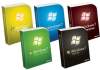


For better or worse, it seems as if Windows 8 will be available in nine separate editions. That’s up three flavors from Windows 7. The unofficial news comes from a registry key found within the Windows 8 Consumer Preview. If this key is to be believed, Windows 8 will be available in the six editions of Windows 7 with the addition of Windows 8 Professional Plus, Enterprise Evaluation, and ARM edition. That makes nine Windows 8 versions in all — seven more editions than Apple’s OS X.
The difference is important. It speaks to the approach these to companies have toward OS sales. Microsoft, the still massively dominant player in desktop computing, has a version for nearly every environment ranging from OEM netbooks to massive enterprise environments. The difference between the versions often involves additional (or missing) applications, networking support and security features. On the other hand, Apple puts all their goodies in one basket and sells only one consumer desktop option. There’s always OS X server, too, which Apple branded as the “Server For Everyone”.
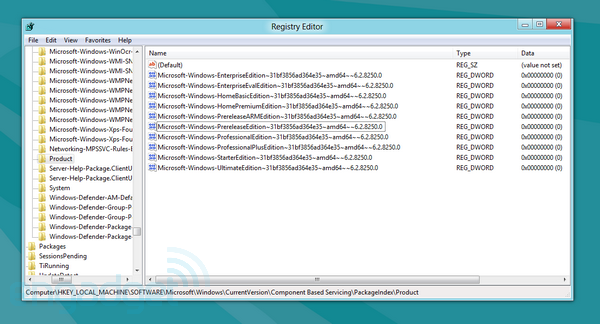
These differences are even more apparent when considering their price. OS X costs $29.99 and Server is only $49.99. Windows 7 Starter and Basic isn’t sold directly to consumers but they can still be found online for less than $100. The Microsoft Store lists Windows 7 Home Premium, Professional, and Ultimate from $199, $299, and $319, respectively (upgrade prices are a bit less).
Navigating the different versions of Windows is a hassle. The operating system can cost nearly as much as new computer. Plus, if a consumer was going to spend hundreds of dollars for the OS, they’re forced to either spend even more money or live with missing features. Windows is heavily pirated for a reason.
Apple on the other hand shoehorns everything into one version and makes it available for a relatively low price. Why? Apple is a hardware company that happens to also sell software. Apple makes money when they ship hardware, not software. Apple just needs its software to keep users happy and interested in coming back for more hardware, not pay the company’s light bill.
As a software company, Microsoft doesn’t have this luxury. Redmond must make money off software like Windows and Office. This is their bread and butter. However, prior to Windows 7, Microsoft had trouble encouraging enterprises to upgrade to the latest version of Windows — Windows XP SP3 is just that good, like Windows 2000 before it. Windows Vista was a bust just short of the disaster of Windows ME. Microsoft hit it out of the park with Windows 7, though, and is going to have a hard time convincing enterprise customers to upgrade to Windows 8.
Windows 7 was nearly an instant hit. It hit 4 percent of the total desktop market share just three weeks after its release. Microsoft moved more than 100 million copies in six months, making it the company’s fastest selling operating system ever. As of January 2012, it’s estimated that Microsoft sold more than 525 million copies of Windows — a feat partly accomplished by the six separate versions of the OS.
There isn’t a winner here. Microsoft and Apple have different approaches and goals in regards to their desktop operating systems. It’s easy to stand on a soapbox and yell at Redmond, “You’re doing it wrong! No one wants to spend $300 on an OS!” But that fact is Microsoft seems to know what they’re doing and have the numbers to back it up. Likewise, Apple is on a tear lately, pushing out new revisions of OS X every year as the Mac’s market share increases. That said, Microsoft has a lot more riding on the success of Windows 8 than Apple does on Mountain Lion.
Windows 8 will be released later this year and will finally push Microsoft into the so-called post-PC world. It has a tough game ahead. Windows 8 needs to curb OS X’s explosive growth and kill the iPad. Like Windows 7 before it, Microsoft is letting consumers try out a final beta copy prior to its release (download info here). Windows 8 needs to be more than a home run; it needs to be a World Series game 7 walk-off grand slam against team Apple.
[image credit: engadget]
Friday, February 10, 2012
Key Tips for Being a Successful Website Designer
Key Tips for Being a Successful Website Designer: The web technology is on a rapid progress and the website designer who does not keep himself or herself updated with these progressive changes, cannot go too far in this industry. Moreover, with the competition surging in this domain, it has become all about survival of the fittest. This is why ...

Wednesday, January 25, 2012
5 Habits Small Businesses Should Adopt in 2012
5 Habits Small Businesses Should Adopt in 2012:


As the New Year begins, a lot of us are hoping to do better in our business than last year. And if last year did not meet our expectations, we are looking to improve things. Here are a few thoughts that have emerged as I battle to grow my business:

Get a Higher Goal
We all know how hard it was to start our company, get the product out and get those first 10-20 customers. Now, you are sitting at 65 customers and there is a little bit of money coming in. There is hope for more. You would be at a super comfortable income at 200 customers. Make sure you aim for a 1000 this year. If you don’t plan for a large enough target, you will find it a tough hike to 200 as well.
Get in Deeper
What can you do different for this higher goal? Let’s say you have certain marketing channels to promote your site/product. You are spending on online advertising, have a part-time sales person, are sitting on Twitter and have your web designer helping you with SEO. It’s time to become proficient at some of these things yourself. If you know that getting your site showing on Google will make a much more accelerated impact than making cold calls – learn some basics on SEO (search engine optimization). Take a course, ask people, see what your competition is doing. Sites like blekko give you detailed insights into what makes your competition rank higher on Google.
Get Some Uncle Scrooge in You
Are you still spending $500 per month on those banner ads? Have you calculated conversions on these particular ads to your site? Or is it just a black hole? Those customers you got last month could have come from word of mouth, not those ads. Make sure you measure every dollar that you spend on marketing. Early on, you might not have the cash to splurge on “brand building.” Spend the money if you know you are getting something out if it. I know, it’s hard at times, but you have to be a hawk – don’t give in to sharp sales pitches and good looking sites.
Get a Physical
When was the last time you checked in with your old customers? I know they are still paying you and hence happy, but make sure you know if something is hurting them, or if they are missing something that you could add easily. Also, keep an eye on Twitter, Quora and LinkedIn on what people might be saying about your product or the competition. You can also post questions on this forum to learn more about what you could do better. For the customers that left, send a gentle, personal email asking them what was missing.
Get Some Rest
Thinking of quitting? This might be because you are burnt out with all the effort and hours you are putting in the business. The only reason a business fails after getting to 100 paying customers is because the primary driver (you) did not continue long enough. Make sure you switch off for a few hours in the evening, go to the gym, take a trip or a vacation – you need a reset button. Come back and kill it!
Setting daily goals will convert some of the above ideas into habits that will ensure you hit your targets for this year.
Rest Photo via Shutterstock
From Small Business Trends
5 Habits Small Businesses Should Adopt in 2012
Subscribe to:
Comments (Atom)